Showing posts with label Topic 7: User-centred design (UCD). Show all posts

Sunday, September 16, 2018

7.5: Beyond Usability: designing for pleasure & emotion

7.5
Beyond Usability: Designing for pleasure and emotion
Usability is not the only factor for a designer to consider; products can be designed to evoke pleasure and emotion.

     FOUR-PLEASURE FRAMEWORK: 

  • Socio-pleasure: 
  • Image result for social media
    • Socio-pleasure can be derived from social interaction and are concerned with pleasures derived from social signifiers of belonging, social-enablers and other social self-identification factors. 
    • Examples include email, internet, and mobile phones that facilitate communication between people.

  • Physio-pleasure:
  • Image result for new car inside
    The new car smell is an example of physio-pleasure
    • Is derived from the feel of a product during use from a human's senses, such as the smell, taste, feel of the object. 
    • Examples include: wearing a silk garment, taste of a food, smell of leather, a new car, coffee, or freshly baked bread

  • Psycho-pleasure:
    • Is derived from the cogonanitive demands of using a product or service and the emotional reactions engendered through the experience of using it 
    • Image result for high tech coffee maker
      The Behmor coffee maker is advanced and convenient
    • Examples include: products that were improved or redesigned from the previous type

  • Ideo-pleasure
    • Ideo-pleasures are pleasures that are linked to our ideals, aesthetically, culturally, and otherwise to satisfy people's tastes, values and aspirations. 
    • Image result for organic products
      Organic products embodies healthy food
    • Examples include a product made from biodegradable materials that might be perceived as embodying the value of environmental responsibility.

     Design for emotion:
  • Visceral design: Design that speaks to people's nature in terms of how the expect products and systems to function and how they expect to interact with them
  • Reflective Design: Design that evokes personal memory focussing on the message, culture and meaning or the use of the product
  • Behavioural design: Focussed on use and understanding,  this considers how people will use a product, focussing on functionality
  • https://usabilla.com/blog/designing-usability-just-isnt-enough/
     The attract-converse-transact (ACT) model
The ACT model is a framework for creating designs that improve the relations of users with a product and intentionally trigger emotional responses.
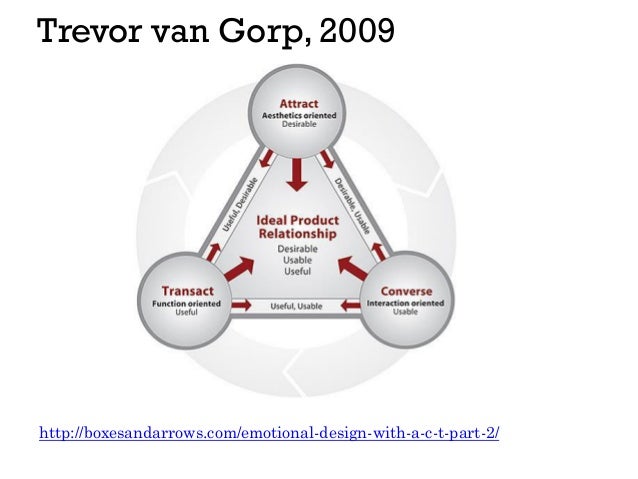
Image result for design act modelACT Model
  • The attract part of the model is aesthetics oriented
  • The converse part of the model is interaction oriented
  • The transact part of the model is function oriented

Sunday, September 9, 2018

7.4: Strategies for UCD

7.4
Strategies for UCD
Users have a central role in evaluating whether the product meets their wants and needs. There are strategies that we use to conduct research.

PRIMARY AND SECONDARY RESEARCH
     Difference between primary/secondary research 
  • Primary - collection and analysis of original information. Examples of primary research include user trial, user research, field trials, product analysis, and observation
  • Secondary - use of existing information (using the internet) examples include literature searches and web searches

QUALITATIVE AND QUANTITATIVE RESEARCH
     Difference between qualitative and quantitative research
  • Qualitative - subjective (measures how and why people behave)
  • Quantitative - measurable (more focused on who, what , where , and when)
    differences between qualitative and quantitative measures

     Field research
  • a first hand observation of customer's user experiences, conducted in the user's environment
  • can be field trials, ethnographic interviews, or observations in the real world
  • field researches conduct takes place in the participant's environment - such as a homework, store, bank or hospital.
  • it is qualitative as it is an observation and not something that can be measured
  • biggest downside to field research is the cost, as it could get very expensive to conduct specialised tests
     Method of extremes

  • this method requires sample users selected to represent the extremes of the user population plus one or two intermediate values.
  • is used to define the range of a user population
  • Deciding whether to use the 5th, 50th, or 95th percentile value depends on what you are designing and who you are designing it for.
    Examples of design situations

    Designing for a range of people

     Observation, interviews, and focus groups

  • user trial where the intended client uses the product and the expert observes - can be in the field (natural environment) or in a lab (controlled environment)
  • Advantages include the unveiling of usability issues
  • Disadvantages include the difficulty of analyzing data
  • Advantages and disadvantages of observations
    Advantages and disadvantages of focus groups 
  • Focus groups are groups of people that share similar traits that are questioned to get results from a specific group; they are a facilitated sessions with a number of individuals from your target audiences brought together to discuss specific elements of your digital offering and customer service
  • Image result for observation in user centred design process
    Design process regarding observation

     Questionnaires

  • the user only answer questions posed to them about a product or context, but they do not have the actual product nor can they test the actual product
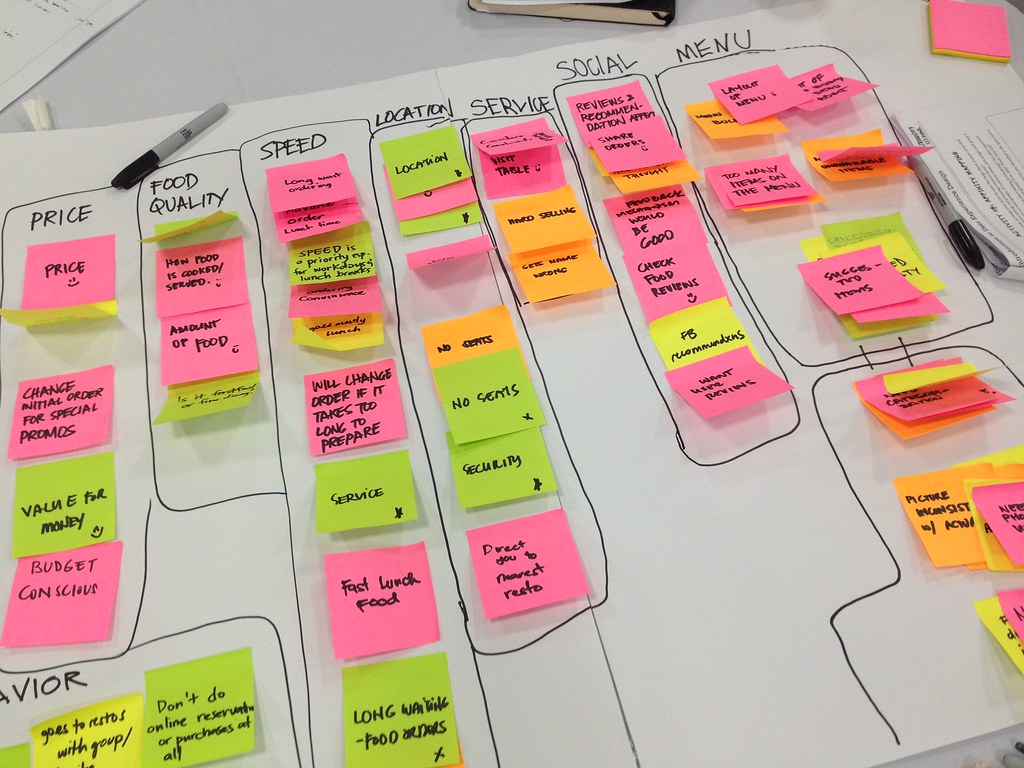
     Affinity diagramming

    Related image
  • a graphical tool that identifies a general theme to collect facts, opinions and ideas, has brainstorming purposes
  • Related image
    Organising thoughts into patterns

  • Data is expressed in creating clusters and groups of common information.

     Participatory design, prototype and usability testing sessions

  • involving target users in the design process, seeks to include the intended users either in the research, concept, design or production of an outcome. It does not just ask users opinions on design issues, but actively involves them int he design and decision-making process.
  • actively involving all stakeholders (eg.employees, partners, customers, end users) in the design process to help ensure the result meets their need and is useable
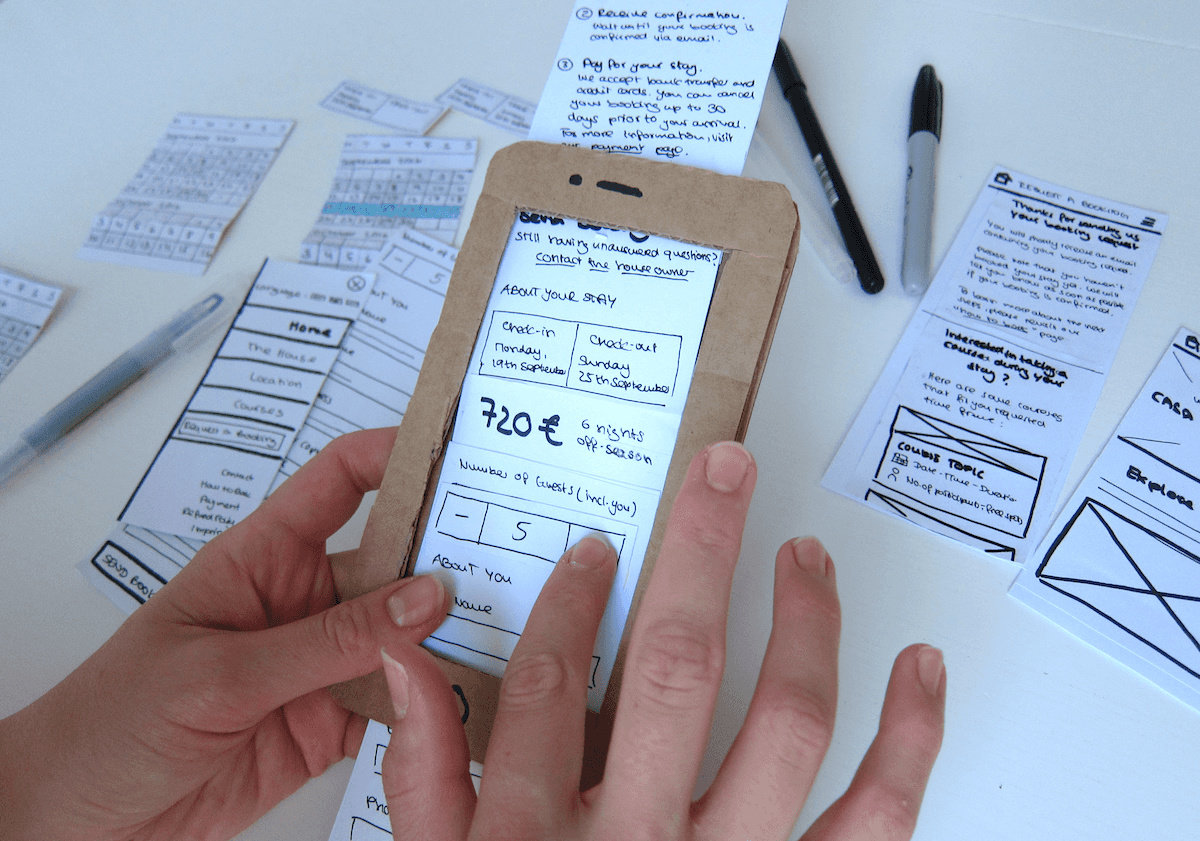
  • Paper prototyping is a variation of usability testing and example of participatory design where representative users perform realistic tasks by interacting with a paper version of the interface - the benefits include that it is cheap and quick and easily disposable

    Image result for paper prototyping
    Example of of a paper prototyped phone
     Natural environments and usability laboratories

  • Usability labs are environments where users are studied taking part in focus groups or some form of participatory design. Usability testing is carried out in a usability laboratory.
  • Usability labs are set up for testing , as they are more controlled.
  • Natural environments are environments in which the user is already comfortable and familiar with, as opposed to a usability lab. The user will be allowed to test products in the comfort of their homes or place of work and monitor them remotely.

     Testing houses versus usability laboratories

  • Advantages of natural environments: solicit data from real and intended contexts, usability is tested in the intended environment.
  • Disadvantages of natural environments: biased opinions from the observers and mostly qualitative data is collected.
  • Advantages of usability labs:

Helpful links:
http://www.designkit.org/methods


7.3: Strategies for User Research

7.3
Strategies for User Research
The designer needs to understand the reasons behind the behaviours, wants and needs of the user. (Potentially through research)

     User population

  • group of people that are expected to use your product (could be a very wide margin or it could be narrow, depending on the functions of the product)
    • BROAD RANGING USER POPULATION - there are many who can use/operate the product, easy to use
      People of all ages can use the iPhone
    • NARROW USER POPULATION - aimed at a group of people, may be difficult to use such as the aircraft cockpit (only pilots may fly it)
      Only a select group of people are able to operate CCTV rooms

     Classification of user

  • User populations can be classified into groups depending on age, gender, and physical condition. 
  • Criteria for user population classifications include interests, habits, nuances, emotional responses to specific stimuli, physical conditions, age, etc.
  • creating design development that are specific to each group and their respective needs
    The OBaby support stroller is designed for the elderly (possibly grandparents) who need to use a walker whilst pushing the stroller.
     Personae
  • is a fictional person who represents a major user group and is behaviour-based
  • each personae has different needs, different attributes (is a guiding criteria when designing a product to fulfil the personae's needs.)
  • Example personae
  • supports the design process by identifying and prioritising the roles and user characteristics of key audiences for a product

Personae help develop specifications in the researching processes.
    • PRIMARY PERSONAE - typical stakeholders and needs must be satified
    • SECONDARY PERSONAE - not the primary target audience, but the product should meet their needs; alternative insights
    • ANTI PERSONAE - for whom the product is not designed for
  • The reasons why a personae is created is to; 
      • Understand the customer in detail
      • identify which group of customers need to be valued
      • improve the quality of products and services across a wide spectrum of design
     Use case

  • use case is a written document that describes the interaction from the user experience.
  • working out how your persona is using your product
  • will provide information about usability and over experience whilst the user interacts with the design solution
  • should depict all possible interactions 
    ATM use case diagram

    Restaurant service use case diagram
  • can be depicted like above diagrams or in step form
     Scenario
  • real-life scenarios that stimulate actual user experiences can generate new findings
  • using persona in a scenario to figure how they might use your product
  • an imagined sequence of events in the daily life of a persona based on assumptions by researches and designers

Sunday, September 2, 2018

7.2: Usability

7.2
Usability
Usability simply means how easy is a product to use for the user. 

     Usability Objectives
what you want in a product, with usability increased/enhanced, your product will more likely be accepted and widely used. ie uber services
Not fulfilling the usability objectives would leave for unsatisfactory users, and decreased positive ratings from users.
  • USEFULNESS - does your product achieve its goals? Is it useful? Product should enable user to achieve the goals for the product.
  • EFFECTIVENESS (ease of use) - how effective is it? it is quantitively measured 
  • LEARNABILITY - is it easy to use? how hard is it for the user to operate the product? Is it easy to learn how to use the created product?
  • ATTITUDE - does it make you feel good? how does the user percept the object, what are their feelings towards it
     Benefits of Enhanced Usability 
it increases product acceptance, user experience and productivity.

     Enhanced Usability Decreased
might cause user error, poor experiences and costs in training and support
Example user interfaces that are complex and possibly lack intuitiveness (from the user)


     Characteristics of good user-product interfaces
  1. Simplicity - Products that are simple to use (the interface) will attract users/consumers opposed to complex and confusing controls.
  2. Ease of use - Similar to simplicity, the interface should be easy to use and not excessively confusing
  3. Intuitive logic and organization - you can use the product without external instructions. Helps the user to quickly become competent in the product operations (with a good design this can be achieved)
  4. Low memory burden - Product should not cause a memory burden when it comes to remembering how to operate the product, for the convenience of the user. The user should be able to intuitively use the product without having to remember the full functionality of a product
  5. Visibility - should be obvious in how the product works, the controls should be openly visible or obvious.
  6. Feedback - a sound or something that happens that indicates an action has happened; provision of information 
  7. Affordance - is the property of an object that indicates how it can be used. eg. buttons afford pushing, umbrellas afford you shelter, chairs affords support, etc. Good products would have a large amount of affordances and would provide the user with a lot of uses from the product.
  8. Mapping - relates to the correspondence between the layout and the controls of the required action. This is the action of mapping/arranging the controls of the product so that it is clear to the user
  9. Constraints - products are designed with in-built constraints, to ensure that they are inserted/used the right way (way to reduce user errors)
     Population stereotypes
items vary depending on countries and the location of the product. consumers in different places might react differently to products.
Wall plugs differ across the world, the population strategy would work in this scenario
     advantages:
  • allows for quick associations and predictions (about behaviour or possible use) to be made about a group of people 
  • user needs and behaviour can be identified and thus usability considerations are met 
     disadvantages:
  • generalisation of the population might not mean accurately fitting all people of the population. preferences could differ between users.
  • judgements could be incorrect.

7.1: User-centred design

7.1
User-centred design (UCD)
The fundamental principle of UCD is understanding the needs of the users is the key to designing the best products and services.

     Principles
  • The design must be curated according to the understanding of the users, tasks and environment. 
  • The design addresses the whole user experience.

A baffling Remote
Remote controls can be confusing

     User, task, and the environment
  1. USER - the UCD pays very particular attention to the needs of the user. The designer makes the item/product to fit the user's needs and wants to best achieve usability (empathic design).
  2. TASK - the design has to consider the task or job that the product is meant to do, eg. the ATM is meant to be a user friendly way to manage their electronic finances.
  3. ENVIRONMENT - where the product is going to be used. eg. cars will be used in the open environment so each aspect of the car has to be carefully planned and placed in the right locations of the car for the eased use of the user. 

     Iterative processes
  • It goes through design stages (akin to the design cycle), and at each stage the user is consulted until requirements are met. This leaves for very careful and thought out planning. 
  • The five stages of the UCD consist of Research, Concept, Design, Implementation, and Launch. These five stages fit right in with the design cycle.
    • RESEARCH - researching the requirements and considerations of the product
    • CONCEPT - brainstorming ways and further developing that ideas to model the potential final product
    • DESIGN - further development of ideas and curated models ie. prototypes and mock ups for the users and designers to evaluate
    • IMPLEMENTATION - testing period of the product with the information gathered used to make improvements to the product
    • LAUNCH - end product is launched and its performance is monitored.
Five stages of UCD

     Multidisciplinary teams
UCD design teams include a variety of experts in different fields, and some include anthropologists, ethnographers, engineers, and psychologists. 

     Inclusive Design
a product made and designed for all users regardless of age, physical, sensory, or disabilities.


test page 1

I can't wait to start DT!

3.3 Physical Modelling

3.3 Physical Modelling Essential Idea: A physical model is a three-dimensional, tangible representation of a design or system Designers ...